JohnCh
-
Posts
3,406 -
Joined
-
Last visited
Content Type
Profiles
Forums
Store
Articles
Gallery
Events
Library
Everything posted by JohnCh
-

The Regular Summary of Classified Ads of Se7ens Found For Sale
JohnCh replied to Croc's topic in Cars For Sale
Interesting air filter setup on that car. I suppose under-bonnet space is at a premium, but river fording is definitely out. -John -
The Regular Summary of Classified Ads of Se7ens Found For Sale
JohnCh replied to Croc's topic in Cars For Sale
Caterham SV with a turbo Zetec has landed on BaT: https://bringatrailer.com/listing/2004-caterham-7-2/ -
Crossflows may not win the HP wars, but they make more than enough to be fun, and to my ears, no other 4-cylinder option sounds better. There are a number of folks here who own or have owned DCOE-fed crossflows, so if you run into challenges sorting out any issues, don't hesitate to start a thread in the General Tech section for input. -John
-
Congrats, it's a nice looking car! What is the engine spec? -John
-
I discovered an unfortunate feature today in the new forum software. If someone is a thread starter and they delete their initial post, they have the unintended consequence of deleting the entire thread. This means they are deleting other people's posts in addition to their own. Although I don't have a problem with someone deleting their own content, I'm not ok with people deleting the content of others. To prevent this from occurring again, I have disabled the ability to delete your posts, however, you can edit them within 24 hours of posting and remove what you wrote. This effectively achieves the same outcome, but if it isn't sufficient for a specific post, please open a Support Request for further assistance. I have updated the FAQ with this information. -John
-
@kayentaskier you aren't losing your mind. It was there earlier. Might have been a proactive deletion by the thread starter to avoid the spanking Croc mentioned. -John
-
Wow, that should be fun! What is the suggested redline with that crank? Also, what drove the reconfiguration of the cam drive? I know the stock hydraulic chain tensioner raises concerns in some circles, but I've never heard of anyone moving to belts before. Thanks, John
-
I'm sure most of you are familiar with Griot's Garage. If not, they produce their own line of liquid car care products here in the US. To support USA7s, they are providing our Paid Club Members with a 15% discount on their liquid car-care product purchases over the next year (expires March 31, 2022.) More details are available here on the Club Matters forum (note: that forum is only visible to Paid Club Members.) -John
-
Closing this since it's a duplicate thread. Initial thread with replies already in place is here: -John
-
I've seen funky behavior before that only occurred with the headlights on. It turned out to be a loose ground on one of the tail lights. Given the PO changed the tail lights, I'd start there and make sure the grounds are very secure. -John
-
I confirmed there is no intake leak. I also spoke with Byron at VRM. He had thought about it over the weekend and had come to the same conclusion as someone else regarding exhaust pulses pulling in fresh air, artificially leaning the readings. As he put it, the engine was just running to well for those numbers to make sense. I'll find time over the next couple of weeks to bring the car back so they can install a WBO2 bung in the exhaust in preparation for another try. If the results are still really lean, then I know I have a bigger problem, likely with the carbs, to diagnose. Thanks, John
-
It has an RD Enterprises header and a cone filter replacing the stock filter at the end of the factory cold air setup. I can't see either of these making much difference. @Pokeythe reason this is confusing is that absent of other information, a needle change seems like the answer. However, other than the header, it's a stock UK-spec engine running the stock UK-spec needle. Although that may not be perfect, I wouldn't expect it to be in the 15:1-16:1 range. It might turn out to be a lot of little things are out of whack and adding up to the lean reading. -John
-
There is a short description of how they work starting at the bottom of page 4 of this PDF with a diagram on page 5. @fastg, that was me. Other than the header, this is supposed to be a stock non-Federal '68 Twin Cam, and the needle is the stock size for that configuration. It seems there are a few possibilities: The AFR data was wrong -- it's possible that reversion was creating artificially lean reading with the WBO2 probe up the tailpipe. Other than a plug cut, I don't know a simple way to confirm this, although I will speak to VRM tomorrow to ask the question. I suspect most of their tuning is done with a sensor screwed into an exhaust port rather than a tailpipe probe. The engine isn't stock -- the hp rating was consistent with what I'd expect from a stock engine, as were the rpms for peak hp and torque, so this is doubtful. There is something else affecting the AFR that mimic what you'd see if the needle was too lean. If this is the answer, I think it's more likely an issue with how the carbs were rebuilt. -John
-
Looking through receipts, I found a 3.5 hour line item to rebuild the carbs, but I can't find a receipt for a rebuild kit or any parts. Also, there was indication from the records that the carbs were converted to adjustable needles. Discovering that after buying the car was a surprise. I have no idea when that was done. Was it performed as part of the rebuild, or was it done at another time in the car's life? I didn't get a chance to do a plug cut yesterday, but will do that next week as the next step. I would like some confirmation that the AFR readings were true before I start tearing things apart. Thanks, John
-
Thanks guys. I found an article where someone experimented with needle height and an AFR gauge. The results supported that the effect at higher rpm was effectively zero. The AFR results on the dyno supported this. I'll research this more. The PO had a shop rebuild the carbs less than a year before I bought it and the thermal actuator is disabled. Of course this doesn't mean they rebuilt them correctly. I'll look through the receipts to see if it lists the replacement parts. The reason I'm not sold on a fuel flow issue is the shape of the AFR curve. Maybe I'm not thinking this through clearly, but if fuel flow was impeded, wouldn't that issue grow larger as fuel demands increased, rather than remain pretty steady? Other than a few random dips, the AFR vacillated from 15:1 to 16:1 from 3400rpm to 6500rpm (graph above was from a run that stopped before 5500rpm, but the initial run showed AFR remained steady to redline.) I would expect it to grow increasingly lean as the revs nearly double if fuel flow was a problem. Thanks, John
-
No, it was a good catch and worth including in the FAQ. Thanks for asking the question. -John
-
My carbs were converted to the adjustable needles and we did adjust height today between runs. That richened the low end, but made no change to the top half of the rpm scale. Based on what I've read, this is expected behavior for Strombergs. The needle height affects the low end, but higher rpm is governed by the needle profile. In hindsight, I wish we had pulled the plugs after a run to confirm lean condition, but at the time, the easy assumption was that the needles were too lean and the readings were correct. I'll try to do a plug check after a hard run this weekend. Thanks, John
-
After hearing I also had a Westfield, they said something about me not being worthy of viewing the big boys' room. Yes, that's Byron. He mentioned your dash is made from crumbly bits. My condolences. -John
-
The engine runs very well. Is it possible that an air leak sufficiently large to drop AFR by that much wouldn't affect idle or low rpm drivability? Someone else mentioned that WBO2 shoved up the tail pipe can create lean readings due to exhaust pulses pulling outside air back into the exhaust. Given my attraction to Murphy's Law, perhaps there are multiple factors at play. I think I'll play around with things this weekend. -John
-
-
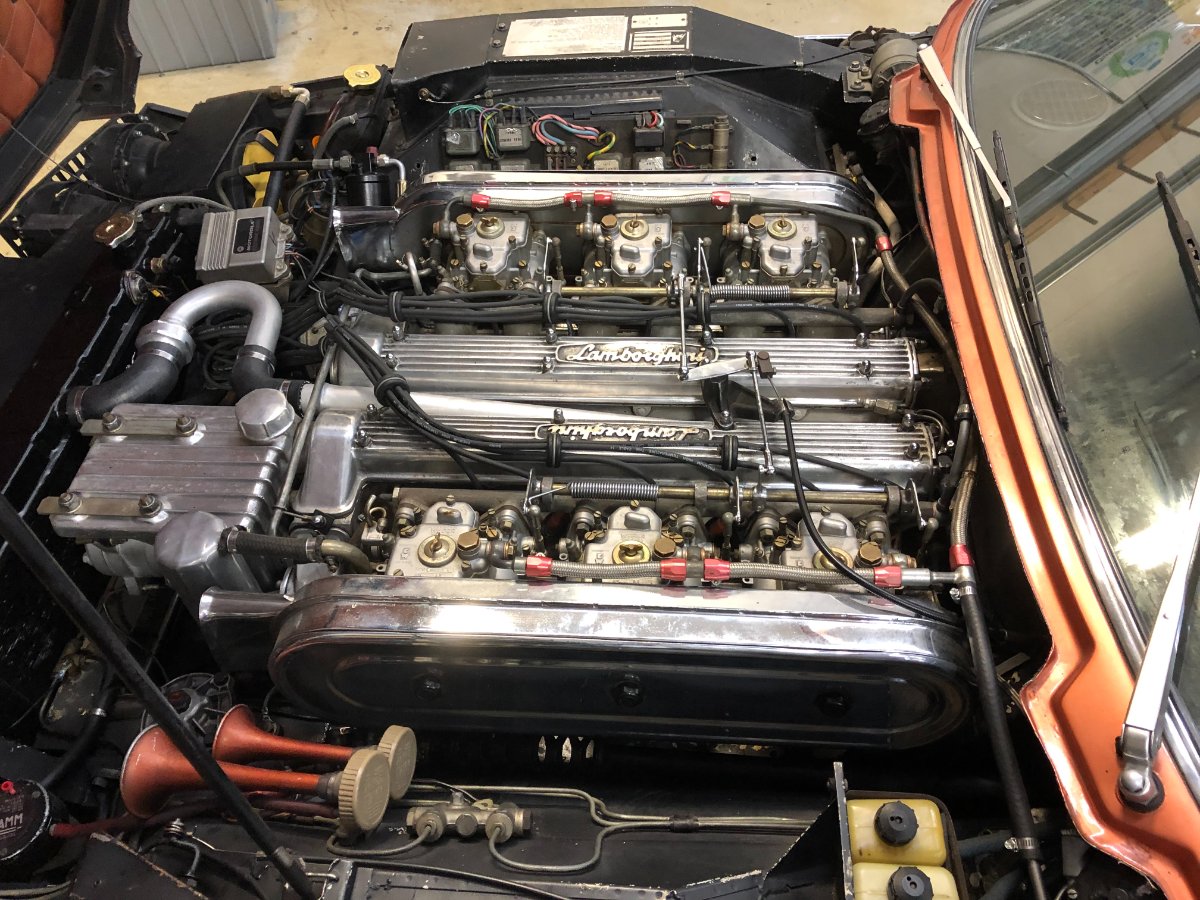
This post could easily live in Off Topic since it's not se7en-specific, but I'm sticking it here since a lot of people have crossflows or twin cams and I do (eventually) have a technical question. Today the Elan visited Vintage Racing Motors to have the advance curve tweaked on the 123 Ignition distributor. VRM has been a staple in vintage race circles for over 30 years, and works on cars that don't just cost as much as a nice house, but sometimes as much as a nice neighborhood (think 250 GTO). It's a great shop to have nearby and is run by real car enthusiasts. Although they keep the 7 figure cars in the back, even the log jam of race cars next to the dyno was full of good stuff. Now for some reason, mixed in with all the proper race cars was this Espada in an…interesting color, with an even more interesting interior. I suppose the owner lost a bet at some point. The engine was pretty spectacular though. Anyway, back to the Elan. The engine runs great. The only reason it was on the dyno was to take advantage of the 123 Ignition's programmable advance curve and dial it in for this specific engine and local fuel. Consequently we were surprised to see very lean AFR numbers after the first run. After brief troubleshooting and needle adjustment, we did two more runs keeping rpms below 5500rpm, but decided to stop further dyno runs to avoid an Oh Sh&t moment. This engine is from the Stromberg era, and has been converted to the UK engine specs, including the carb needles. Those needles should have been fine on a stock motor, so something is awry. Fuel flow is the obvious culprit, but based on the AFR graph and the fact power was still building at redline, that does seem a little odd to me. Does anyone have any experience here? Could it be as simple as a failing mechanical pump or clogged fuel filter? Thanks, John

-
I've updated the FAQ with the information in my last post. -John
-
Thanks Croc. Another way to go directly to anyone's albums, including your own, is to visit that member's profile page. Whenever that page is first launched, the tab in the middle defaults to Activity, which shows their last posts, gallery uploads, etc. By clicking the tab next to it labeled Albums, you'll access all the albums that member has posted. -John
-
210320 Yugawara Sakura Tour - Nikon D3000 version
JohnCh replied to drhasegawa's topic in Member Rides
Hasegawa-san, thank you for sharing the link to your blog. There are some stunning photos there. Although not car related, this is one of my favorites. -John
-
Great to see you using the car as intended! Back road trips are my favorite. Was this an organized trip or did you wing it on your own? 17mpg for a crossflow definitely indicates some richness. Mine used to return about 22-23 overall, and a few mpg higher on freeways. Redondo Beach to King City is pretty far, how many of the 600 miles were back roads vs. freeways? Any photos enroute? BTW you don't need a heater bypass valve. You just need to ditch the heater and save weight -John